

Walgreens Blood Pressure Monitor Manual: A Comprehensive Guide
This manual provides essential guidance for operating your Walgreens blood pressure monitor, ensuring accurate readings and optimal health management.
It details setup,
measurement techniques,
troubleshooting,
and safety precautions,
supporting regular monitoring as of December 19, 2025.
Understanding Your Walgreens BP Monitor
Your Walgreens blood pressure monitor is a sophisticated device designed for convenient and reliable home blood pressure measurement. It’s crucial to understand its core functionality to obtain accurate results and effectively manage your cardiovascular health. This monitor allows for regular tracking, helping you and your healthcare provider assess your blood pressure trends over time.
The device supports multiple user profiles, enabling different individuals within a household to store and track their readings separately. Familiarize yourself with the display symbols, which provide vital information about your measurement status, error codes (like “EP” or “System Error”), and battery levels. Remember, consistent and correct usage, as outlined in this manual, is paramount for dependable data.
Regular monitoring is especially important, as high blood pressure often presents no initial symptoms; This monitor, coupled with informed usage, empowers you to proactively manage your well-being and collaborate effectively with your doctor. It’s a valuable tool for pharmacy, health, and wellness needs.
Components and Features
The Walgreens blood pressure monitor package includes the monitor unit itself, a comfortable inflatable cuff designed for standard adult arm sizes, and a user manual providing detailed instructions. Key features include a digital display showcasing systolic and diastolic blood pressure readings, pulse rate, and date/time. The monitor boasts a memory function capable of storing multiple readings, allowing for trend analysis.
User profile functionality enables personalized tracking for up to two users, identified as User 1 and User 2. The device operates on batteries, ensuring portability and convenience. It incorporates error message indicators, such as “System Error” and “EP”, to alert users to potential issues during measurement. The intuitive button layout facilitates easy navigation through settings and functions.
This monitor is designed for home use, supporting proactive health management and providing valuable data for discussions with healthcare professionals. It’s a reliable tool for pharmacy, health, and wellness monitoring, offering a convenient alternative to clinical visits.
Initial Setup and Battery Installation
Before first use, carefully unpack your Walgreens blood pressure monitor and inspect all components. The monitor requires battery installation to operate. Typically, it utilizes standard AA batteries – the quantity needed will be specified in the user manual. Locate the battery compartment, usually on the back or underside of the unit.
Open the compartment cover, observing the polarity markings (+ and -) inside. Insert the batteries accordingly, ensuring proper alignment. Replace the cover securely. Upon battery installation, the display should illuminate, indicating the monitor is powered on. If the display doesn’t activate, double-check battery placement and ensure they are fresh.
Setting the correct date and time is crucial for accurate data storage and tracking. Refer to the “Setting the Date and Time” section of this manual for detailed instructions on navigating the settings menu using the ‘SET’ button. Proper initial setup ensures reliable performance and accurate blood pressure measurements.
Understanding the Display Symbols
The Walgreens blood pressure monitor’s display utilizes various symbols to convey information about your readings and the device’s status. Familiarizing yourself with these symbols is essential for accurate interpretation. A pulsing heart symbol indicates the monitor is actively measuring your blood pressure. The systolic and diastolic values are prominently displayed, representing the pressure during heart contraction and relaxation, respectively.
A “User” symbol, such as “User 1,” signifies which user profile is currently selected, allowing for personalized data storage. Error messages, like “System Error” or “EP,” will appear with corresponding symbols, prompting troubleshooting steps as detailed in the manual. The battery level indicator shows remaining power, alerting you when replacement is needed.
Additional symbols may indicate irregular heartbeat detection or memory storage status. Refer to the detailed diagram within this manual for a comprehensive explanation of each symbol and its meaning, ensuring you fully understand the information presented on the display.
Preparing for a Measurement
Before taking a blood pressure measurement with your Walgreens monitor, several preparatory steps are crucial for accuracy. It’s recommended to rest quietly for at least five minutes in a comfortable position, seated with your back supported and feet flat on the floor. Avoid caffeine, alcohol, and smoking for at least 30 minutes prior to measurement, as these can influence your blood pressure.
Ensure your bladder is empty, as a full bladder can elevate readings. Wear loose-fitting clothing that allows easy access to your upper arm. Remove any constricting jewelry or tight sleeves. It’s important to be relaxed and avoid talking during the measurement process. Consistent preparation will contribute to reliable and comparable readings over time, aiding in effective health monitoring.
Remember, even if you feel no symptoms of high blood pressure, regular checks are essential. Proper preparation maximizes the accuracy of your Walgreens BP monitor.
Correct Cuff Placement
Proper cuff placement is paramount for obtaining accurate blood pressure readings with your Walgreens monitor. Position the cuff on your upper arm, ensuring the lower edge is approximately one inch (2-3 cm) above your elbow. The artery marker on the cuff should align with the brachial artery, located on the inner side of your elbow.
The cuff should be snug, but not too tight – you should be able to slip one finger comfortably between the cuff and your arm. Avoid placing the cuff over clothing, as this can distort the reading. Ensure your arm is supported at heart level throughout the measurement. Incorrect placement, such as applying the cuff too loosely or too tightly, can lead to inaccurate results.
Consistent cuff placement, following these guidelines, is vital for reliable monitoring and effective management of your cardiovascular health. Refer to the manual’s illustrations for visual guidance.
Taking a Blood Pressure Measurement
To initiate a measurement, power on your Walgreens blood pressure monitor. Remain seated comfortably with your back supported and feet flat on the floor. Ensure your arm is supported at heart level with the cuff correctly positioned, as detailed previously. Press the ‘Start’ button to begin the inflation process.
The cuff will automatically inflate, and you’ll feel pressure on your arm. Remain still and quiet during inflation and deflation – avoid talking or moving. The monitor will display your systolic and diastolic blood pressure readings, along with your pulse rate. The measurement process typically takes around 30-60 seconds.

Record your readings for tracking purposes. It’s recommended to take multiple measurements at different times of the day for a comprehensive assessment. If an error occurs, consult the troubleshooting section.
Understanding Your Readings: Systolic and Diastolic
Blood pressure readings consist of two numbers: systolic and diastolic, measured in millimeters of mercury (mmHg); Systolic pressure, the top number, represents the pressure in your arteries when your heart beats. Diastolic pressure, the bottom number, indicates the pressure in your arteries when your heart rests between beats.
Generally, a normal blood pressure reading is considered to be less than 120/80 mmHg. Elevated readings may indicate prehypertension or hypertension (high blood pressure). However, interpreting your readings requires consideration of individual health factors.
It’s important to note that you may not experience symptoms with high blood pressure, emphasizing the need for regular monitoring. Consistent high readings warrant consultation with a healthcare professional for proper diagnosis and treatment. Understanding these values empowers proactive health management.
Memory Function and Data Storage
Your Walgreens blood pressure monitor is equipped with a memory function to store previous readings, allowing you to track your blood pressure trends over time. This feature is invaluable for identifying patterns and sharing data with your healthcare provider. The monitor can typically store a significant number of readings, often with date and time stamps.
Accessing stored data is usually straightforward, involving dedicated buttons to recall and review past measurements. Some models allow you to view average readings calculated over a specified period. Utilizing this function helps in assessing the effectiveness of lifestyle changes or medication.
Remember to familiarize yourself with the specific storage capacity and recall procedures outlined in the manual. Regular review of stored data, alongside professional guidance, contributes to proactive cardiovascular health management and informed decision-making.
User Profiles and Multiple Users
Many Walgreens blood pressure monitors offer the convenience of multiple user profiles, enabling several individuals within a household to track their readings independently. This feature is particularly useful for families where more than one person requires regular blood pressure monitoring. Each user can store their data separately, ensuring personalized and accurate tracking.
Setting up user profiles typically involves assigning a user number (like User 1, User 2) and storing associated data under that profile. This prevents readings from being mixed up and allows for individual health management. The manual will detail the specific steps for creating and switching between user profiles.
Proper profile management is crucial for maintaining data integrity. Always ensure the correct user profile is selected before taking a measurement, and familiarize yourself with the process of deleting or modifying profiles as needed. This feature promotes responsible and personalized healthcare tracking.
Troubleshooting: Common Error Messages

Encountering error messages on your Walgreens blood pressure monitor doesn’t necessarily indicate a serious problem, but requires attention. A common message is “System Error,” which generally resolves by simply turning the monitor off and then on again to restart the process. However, if the “EP” error code persists even after restarting, it’s crucial to contact Consumer Relations for assistance.
These error codes often signal temporary malfunctions or issues with the measurement process. Refer to the detailed troubleshooting section within this manual for more specific guidance on addressing various error messages. Understanding these codes empowers you to resolve minor issues independently.
If issues continue, don’t attempt to disassemble or repair the monitor yourself. Contacting customer support ensures proper diagnosis and prevents potential damage. Remember to note the exact error message displayed for efficient assistance from a representative.
“System Error” and “EP” Error Code
The “System Error” message typically indicates a temporary internal glitch within the Walgreens blood pressure monitor. A simple power cycle – turning the device off and then back on – often resolves this issue, allowing you to resume measurements. This resets the system and clears any transient errors that may have occurred during operation.
The “EP” error code, however, suggests a more persistent problem. If this code appears on the display, attempting a measurement again is the first step. But, crucially, if the “EP” code continues to show after a restart and subsequent attempt, it’s essential to contact a Consumer Relations representative for further support and guidance.
Do not attempt self-repair. The “EP” code could indicate a sensor malfunction or other internal issue requiring professional attention. Promptly contacting support ensures accurate diagnosis and prevents potential damage to the device, maintaining its reliability for future health monitoring.
Addressing Inconsistent Readings
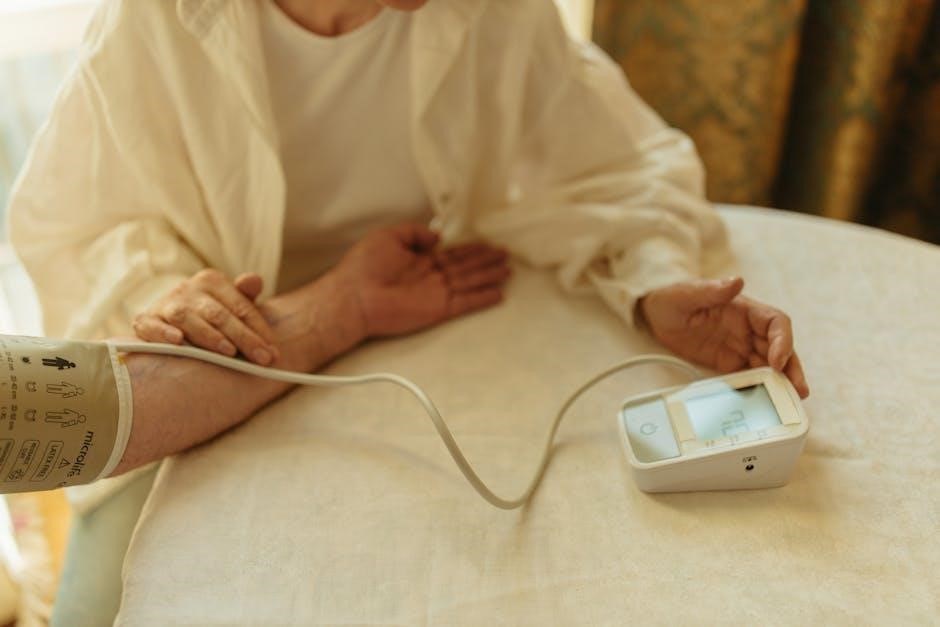
Inconsistent blood pressure readings are common and rarely indicate a monitor malfunction. Several factors can contribute, including movement during measurement, incorrect cuff placement, or even recent caffeine intake. To mitigate this, ensure you are seated quietly for five minutes before each reading, with your back supported and feet flat on the floor.
Verify proper cuff application – it should be snug but not too tight, positioned correctly on your upper arm. Avoid talking or crossing your legs during the measurement process. If readings remain inconsistent, take two to three measurements, spaced a few minutes apart, and record the average.
High blood pressure often presents no initial symptoms, making regular monitoring crucial. If discrepancies persist despite following these guidelines, consult your healthcare professional to rule out underlying medical conditions or discuss alternative monitoring strategies. Consistent, accurate data is vital for effective health management.
Setting the Date and Time
Accurate date and time settings are crucial for proper data storage and recall within your Walgreens blood pressure monitor’s memory function. To adjust these settings, locate the “SET” button on your device. Pressing this button initiates the setting mode, allowing you to cycle through the month, day, year, hour, and minute.
Each press of the “SET” button will increment the selected parameter by one. Continue pressing until the correct value is displayed for each field – month, day, year, hour, and minute – in that specific order. Ensure you are mindful of the AM/PM designation when setting the hour.
Confirm each setting before proceeding to the next. Incorrect date and time settings can lead to inaccurate data logging and retrieval. This process ensures your blood pressure readings are correctly timestamped, providing a valuable record for tracking your health over time.
Cleaning and Maintenance
Regular cleaning and maintenance are essential for ensuring the longevity and accuracy of your Walgreens blood pressure monitor. To clean the device, gently wipe the monitor and cuff with a soft, dry cloth. Avoid using abrasive cleaners, solvents, or excessive moisture, as these can damage the sensitive electronic components.
The cuff can be cleaned with a slightly damp cloth if necessary, but ensure it is completely dry before reattaching it to the monitor. Do not immerse the monitor or cuff in water. Inspect the cuff regularly for signs of wear and tear, such as cracks or leaks.
Proper storage is also important. Keep the monitor in a cool, dry place, away from direct sunlight and extreme temperatures. Avoid storing the device with heavy objects on top of it, as this could cause damage. Consistent care will help maintain the reliability of your blood pressure measurements.
Battery Replacement
Maintaining fresh batteries is crucial for accurate operation of your Walgreens blood pressure monitor. The device typically requires standard batteries – consult your model’s specifications for the correct type and quantity. When the low battery indicator appears on the display, it’s time for a replacement.
To replace the batteries, locate the battery compartment (usually on the back or bottom of the monitor). Open the compartment and remove the old batteries, noting the correct polarity (+ and -). Insert the new batteries, ensuring they are aligned properly. Close the battery compartment securely.
Dispose of used batteries responsibly, following local regulations for battery recycling. Do not mix old and new batteries, or different types of batteries. Replacing the batteries promptly ensures continuous and reliable blood pressure monitoring, contributing to consistent health tracking.
Accuracy and Calibration
Ensuring accuracy is paramount when using your Walgreens blood pressure monitor for health management. While these monitors are designed for home use, periodic verification against a calibrated medical device is recommended. Calibration, however, is generally not user-adjustable in these models; they are pre-calibrated at the factory.
Factors influencing accuracy include correct cuff placement, proper body positioning during measurement, and avoiding movement or conversation. Inconsistent readings may indicate improper technique rather than a device malfunction. If you consistently observe discrepancies, review the ‘Troubleshooting’ section.
Regularly check the monitor’s functionality and compare readings with those taken at a healthcare professional’s office. If significant differences persist, contact Walgreens Consumer Relations for assistance. Maintaining a consistent measurement routine and understanding potential influencing factors will contribute to reliable blood pressure tracking.

When to Consult a Healthcare Professional
Regular blood pressure monitoring at home is valuable, but it doesn’t replace professional medical advice. Consult your doctor if you experience consistently high readings, even when following the manual’s instructions precisely. Remember, high blood pressure often presents without noticeable symptoms initially.
Seek immediate medical attention if you encounter severely elevated blood pressure readings accompanied by symptoms like severe headache, chest pain, vision changes, or difficulty breathing. These could indicate a hypertensive crisis requiring urgent care.
Discuss your readings with your healthcare provider during routine check-ups, even if they fall within the normal range. They can assess your overall cardiovascular health and adjust treatment plans accordingly. Don’t self-diagnose or alter medication dosages based solely on home monitor results; always follow your doctor’s guidance.
Important Safety Precautions
This blood pressure monitor is designed for home use only and should not be used for medical diagnosis or treatment. Always consult a healthcare professional for interpretation of results and any health concerns. Keep the device out of reach of children to prevent accidental misuse or damage.
Do not apply the cuff over damaged skin or areas receiving intravenous therapy. Avoid using the monitor in the presence of flammable materials or explosive atmospheres. Ensure the tubing is not kinked or twisted during operation, as this can affect accuracy.
Never disassemble the monitor beyond the battery replacement instructions. If the device malfunctions, discontinue use and contact customer support. Avoid exposing the monitor to extreme temperatures or humidity. Proper maintenance, as outlined in this manual, is crucial for safe and reliable operation;
Warranty Information and Customer Support
Your Walgreens Blood Pressure Monitor is covered by a limited warranty against defects in materials and workmanship. This warranty typically lasts for one year from the date of original purchase, subject to proof of purchase. The warranty does not cover damage resulting from misuse, accidents, or unauthorized repairs.
For warranty claims or customer support, please contact Walgreens Consumer Relations. You can find contact information on the Walgreens website or within the packaging of your monitor. Support representatives are available to assist with troubleshooting, answer questions, and process warranty requests.
Walgreens is committed to providing excellent customer service. Visit Walgreens online for frequently asked questions, additional resources, and information about other health and wellness products. Keep your purchase receipt readily available for any warranty-related inquiries.